This is the full developer documentation for jabol
# Environment variables
> Every JABOL_* variable jabol reads at boot.
jabol’s server reads these on startup. Most have sensible defaults; the only one you must set in production is `JABOL_AUTH_SECRET`.
| Var | Default | Purpose |
| ---------------------- | ----------------------- | --------------------------------------------------- |
| `PORT` | `8080` | Listen port. |
| `JABOL_BASE_URL` | `http://localhost:8080` | Used by better-auth for cookie + trusted origins. |
| `JABOL_CONFIG_PATH` | `/config/links.json` | Path to the links JSON file. |
| `JABOL_DATA_DIR` | `/data` | Writable dir for `auth.db` and `icons/`. |
| `JABOL_AUTH_SECRET` | dev-only fallback | **Set this in production.** Used to sign sessions. |
| `JABOL_ADMIN_EMAIL` | — | If set with password, seeds an admin on first boot. |
| `JABOL_ADMIN_PASSWORD` | — | Paired with `JABOL_ADMIN_EMAIL`. Min 8 chars. |
## `JABOL_BASE_URL` and authentication
`JABOL_BASE_URL` is used by better-auth to validate the `Origin` header on sign-in requests. If you’re deploying behind a reverse proxy on a public domain, set this to your public URL (e.g. `https://links.example.com`). Leaving it at the localhost default in production breaks sign-in because the cookie origin doesn’t match.
## `JABOL_AUTH_SECRET`
Generate a strong value with `openssl rand -hex 32`. Keep it stable across deploys — if you change it, all existing sessions are invalidated and every admin has to sign in again.
## Read-only mode
If `links.json` is mounted read-only (or its parent directory isn’t writable by the runtime user), jabol detects this at boot and disables all mutating admin routes. The admin UI shows a banner and clicking actions like “Save” returns `403`. Auth still works, so admins can sign in to see hidden links.
# Install
> Run jabol with Docker, Docker Compose, or Node directly.
The fastest way to run jabol is the published Docker image [`stephanrandle/jabol`](https://hub.docker.com/r/stephanrandle/jabol).
## Docker (single command)
```sh
docker run -d \
-p 8080:8080 \
-v "$PWD/links.json:/config/links.json" \
-v "$PWD/data:/data" \
-e JABOL_AUTH_SECRET="$(openssl rand -hex 32)" \
stephanrandle/jabol:latest
```
* `-v "$PWD/links.json:/config/links.json"` — bind-mounts your config file. If the file doesn’t exist on the host yet, jabol’s entrypoint seeds a starter `links.json` for you on first boot.
* `-v "$PWD/data:/data"` — persistent storage for `auth.db` (admin accounts + sessions) and the cached favicon / OG-image directory.
* `JABOL_AUTH_SECRET` — required in production. Used by better-auth to sign session cookies.
See [Environment](/jabol/getting-started/environment/) for every supported variable.
## Docker Compose
A ready-to-use compose file ships in the repo. See [Docker Compose](/jabol/deploy/docker-compose/) for a walkthrough.
## Coolify
Coolify deploys the compose file in a few clicks. See [Coolify](/jabol/deploy/coolify/) for the specifics, including the gotcha around UID ownership on Coolify-managed volumes.
## From source (development)
```sh
git clone https://github.com/stephansama/jabol
cd jabol
pnpm install
JABOL_CONFIG_PATH=./examples/categorized.json \
JABOL_DATA_DIR=./.data \
JABOL_AUTH_SECRET=dev \
pnpm dev
```
The Hono server runs on `:8080`, the Vite SPA on `:5173` with `/api/*` proxied. See [Development](/jabol/development/) for more.
# Quickstart
> First boot — create an admin and populate your links.
After [installing](/jabol/getting-started/install/) and starting the container, open .
## 1. Create the first admin
The first time jabol boots with no admin account, the **/signup** route is open. Visit `/signup`, set an email + password, submit. As soon as one admin exists, `/signup` returns 404 — jabol is single-tenant by design.
You can skip the signup page entirely by setting both `JABOL_ADMIN_EMAIL` and `JABOL_ADMIN_PASSWORD` env vars on first boot. The admin is seeded automatically and you go straight to `/login`.
## 2. Sign in
`/login` accepts the credentials you just created. Sessions persist for 30 days by default (cookie-based, via better-auth).
## 3. Populate your links
You have three options:
**Edit from the admin UI.** Go to `/admin`, click “Add link” inside a category (there’s a starter “Welcome” category on first boot). The form takes a name, URL, optional iconify icon, tags, etc. Favicons and OG images auto-scrape from the URL.
**Drag-drop a `links.json`.** The admin page has a DropZone at the top of the Links section. Drop a full `links.json` to replace the canonical in one go.
**Edit the JSON file directly.** If you mounted `links.json` from the host, edit it in your favorite editor and save. jabol’s file watcher picks up the change and pushes it to every connected browser via SSE — no reload needed.
## 4. Visit the home page
Go back to `/`. Your links render as cards. Search with `/`, navigate with arrow keys, hit `Enter` to open. See [Admin overview](/jabol/admin/overview/) for everything you can configure from the UI.
# Category fields
> What each entry in the categories array of links.json accepts.
Each entry in the top-level `categories` array (categorized shape only) accepts:
| Field | Type | Notes |
| -------- | --------- | ------------------------------------------------------------------------------------------------------------------------ |
| `name` | `string` | Required. Shown as the section header on the home page. |
| `icon` | `string` | Optional Iconify id (e.g. `mdi:briefcase`) or absolute URL, rendered beside the name. |
| `hidden` | `boolean` | If `true`, the whole category — header and every link inside it — is gated behind admin auth. Mirrors per-link `hidden`. |
| `id` | `string` | UUID stamped by jabol on first read. Don’t set by hand. |
| `links` | `array` | The category’s links. See [Link fields](/jabol/configuration/link-fields/). |
The flat shape’s synthetic categories (built from each link’s first tag when `groupByTag: true`) are derived at load time and don’t carry any of these fields — gate links in flat mode with per-link `hidden` instead.
## `hidden`
A hidden category is omitted entirely from the public `/api/links` response — its name doesn’t appear in the body, the category jump menu, or the search results, and none of its links leak either (regardless of their per-link `hidden` state). An admin signed in sees the category render with a `🔒 hidden` badge next to its name and can toggle it from the admin UI.
Useful for keeping a “Work” or “Internal tools” catalog out of public view without having to mark every link inside hidden one-by-one.
# JSON Schema
> Editor autocomplete, validation, and hover docs for links.json.
jabol ships a JSON Schema generated from the same Zod definitions the server uses to validate `links.json` at boot. Point your editor at it and you get autocomplete, schema validation, and field-level hover docs while you edit.
## The `$schema` pointer
Add `"$schema"` as the first key in your `links.json`:
```json
{
"$schema": "https://raw.githubusercontent.com/stephansama/jabol/refs/heads/main/schema/links.schema.json",
"title": "Homelab",
"categories": [
/* … */
]
}
```
VS Code, JetBrains IDEs, Neovim (with `vscode-json-languageservice` / `coc-json` / `nvim-cmp`), and any other JSON-Schema-aware tool will fetch the schema and offer:
* Autocomplete for top-level keys, category keys, and link keys.
* Inline validation — invalid values are underlined immediately.
* Hover tooltips on each field with the descriptions from [Top-level fields](/jabol/configuration/top-level-fields/) and [Link fields](/jabol/configuration/link-fields/).
## Where the schema lives
The canonical schema file is at [`schema/links.schema.json`](https://github.com/stephansama/jabol/blob/main/schema/links.schema.json) in the repo. The raw URL above is what you embed in `$schema`.
## How it’s generated
The schema is derived from `server/enrich/schema.ts` (the Zod source) via `pnpm schema:generate`. CI’s `schema:check` job fails any PR where the committed schema drifts from the Zod source, so the file you point at is always in sync with the validation the server does at boot.
## Project-wide editor config (VS Code)
If your `links.json` is named something else, or you want autocomplete without editing the file itself, point at the schema from `.vscode/settings.json`:
```json
{
"json.schemas": [
{
"fileMatch": ["links.json", "my-links.json"],
"url": "https://raw.githubusercontent.com/stephansama/jabol/refs/heads/main/schema/links.schema.json"
}
]
}
```
# Link fields
> What each link object in links.json accepts.
Each entry in a category’s `links` array (or in the flat top-level `links` array) accepts:
| Field | Type | Notes |
| --------------- | ---------- | ------------------------------------------------------------------------------------------------------------------ |
| `name` | `string` | Required. Display name. |
| `url` | `string` | Required, http(s). |
| `description` | `string` | Optional, shown under the name. |
| `icon` | `string` | Optional. Iconify id (e.g. `mdi:github`) or absolute URL. If absent, jabol scrapes the page favicon and caches it. |
| `image` | `string` | Optional OG image override. If absent, jabol scrapes `og:image`. Used as the card hero in comfortable density. |
| `tags` | `string[]` | Optional. Searched, shown as pills, and clickable to filter the view. |
| `hidden` | `boolean` | If `true`, only authenticated admins see the link. |
| `openInSameTab` | `boolean` | If `true`, the link opens in the current tab. Default opens in a new tab. |
| `id` | `string` | UUID stamped by jabol on first read. Don’t set by hand. |
## `icon` — three forms
* **Iconify id** (`mdi:github`, `simple-icons:vercel`, etc.) — looked up client-side via [@iconify/react](https://iconify.design/). No network request from the server. Best when you want a consistent monochrome look.
* **Absolute URL** (`https://example.com/icon.png`) — the server downloads and caches the image, then serves it from `/api/icons/`.
* **Omitted** — the enrichment pipeline scrapes ``, ``, `` from the target page, falls back to the well-known `/favicon.ico`, then to Google’s S2 favicon service. The first successful candidate is cached.
## `image` — OG hero
Cards in comfortable density show a 16:9 hero image. If `image` is set, that URL is used. Otherwise the enrichment pipeline grabs `` and caches it. If neither produces an image, the card falls back to a textured cover tinted to the category’s hue with the link’s initial centered.
## `tags`
Tags are fuzzy-searched along with `name` and `description`. The home page shows them as small pills under each card name; clicking a pill filters the view to that tag. Tags also drive the synthetic category grouping in flat mode (`groupByTag: true`).
## `hidden`
A hidden link is omitted from the public `/api/links` response entirely. When an admin is signed in, they still see it in `/api/links/admin` and on the home page (marked with a `🔒 hidden` badge). Useful for private bookmarks you don’t want to expose if someone shares your jabol URL.
## `openInSameTab`
Default is `false` (open in a new tab via `target="_blank"`). Set to `true` for links you want to navigate the current tab — handy for “go to dashboard” entries that are meant to replace the directory page.
# links.json
> Two equivalent shapes — categorized or flat — for the canonical config file.
`links.json` is the canonical data file. jabol accepts two equivalent shapes at the edge — they’re both normalized into the same internal structure on load.
## Categorized
Group links under named categories. The category order in the file is the order on the page.
```json
{
"title": "Homelab",
"theme": "mocha",
"categories": [
{
"name": "Dev",
"icon": "mdi:code-tags",
"links": [
{ "name": "GitHub", "url": "https://github.com", "icon": "mdi:github" },
{
"name": "MDN",
"url": "https://developer.mozilla.org",
"tags": ["docs"]
}
]
}
]
}
```
See [`examples/categorized.json`](https://github.com/stephansama/jabol/blob/main/examples/categorized.json) for a fuller starter.
## Flat (with optional tag grouping)
If your links are a flat bag, use this shape. Set `groupByTag: true` to have jabol bucket links into synthetic categories using each link’s first tag.
```json
{
"title": "Bookmarks",
"theme": "latte",
"groupByTag": true,
"links": [
{ "name": "GitHub", "url": "https://github.com", "tags": ["dev"] },
{
"name": "Hacker News",
"url": "https://news.ycombinator.com",
"tags": ["news"]
}
]
}
```
See [`examples/flat.json`](https://github.com/stephansama/jabol/blob/main/examples/flat.json).
## Field reference
* [Top-level fields](/jabol/configuration/top-level-fields/) — `brand`, `title`, `description`, `favicon`, `image`, `theme`, and shape-specific keys.
* [Category fields](/jabol/configuration/category-fields/) — `name`, `icon`, `hidden`, and the per-category `links` array.
* [Link fields](/jabol/configuration/link-fields/) — what each link object accepts.
## IDs and the file lifecycle
jabol stamps a UUID on each category and link the first time it reads the file, so admin edits are addressable. Those IDs round-trip through the JSON on every persist — don’t strip them when editing by hand.
External edits to `links.json` (e.g. you `vim` the file) are picked up by a file watcher and pushed to connected browsers via SSE — no reload needed.
# Top-level fields
> The keys you can set at the root of links.json.
These keys live at the root of `links.json`, alongside `categories` or `links`.
| Field | Type | Notes |
| ------------- | --------- | ----------------------------------------------------------------------------------------------------------------------- |
| `$schema` | `string` | Optional. URL of the JSON Schema for editor autocomplete. See [JSON Schema](/jabol/configuration/json-schema/). |
| `brand` | `string` | Organization name. Shown in the top bar, used as the browser tab title. Editable from `/admin`. |
| `title` | `string` | Collection title shown as a sub-label next to the brand. Editable from `/admin`. |
| `description` | `string` | Page description / meta. |
| `favicon` | `string` | URL or `/api/icons/...` path for the favicon. Set via the Branding panel in `/admin`. |
| `image` | `string` | OG image used when the page is shared on social platforms. Absolute URL or `/api/icons/...` path; recommended 1200×630. |
| `theme` | `string` | First-time-visitor theme: `light` / `dark` / `mocha` / `latte` (Catppuccin variants). |
| `groupByTag` | `boolean` | Flat shape only. If `true`, links bucket into synthetic categories by their first tag. |
## `brand` vs `title`
`brand` is your wordmark (the thing on the left of the top bar — “Acme Co”). `title` is the sub-label (the collection name — “Internal links”). They render together as `Acme Co / Internal links`. Either is optional; both are editable from the admin Branding panel.
## `favicon`
Accepts either an absolute URL or a `/api/icons/...` path. The admin panel lets you upload a file (cached locally) or paste an external URL (which jabol downloads and caches). Both produce the same `/api/icons/...` form in the persisted JSON.
## `image`
Used at the head-tag layer only — jabol emits it as `og:image` and `twitter:image` so social platforms can render a large card when someone shares your URL. Kept separate from `favicon` because favicons are small icons (16–32px) and OG cards are large banners (1200×630 is the recommended size); reusing one for the other looks bad in previews.
If `image` is unset, jabol simply omits the `og:image` / `twitter:image` tags rather than falling back to the favicon — Slack/Twitter/Discord will render a plain text card instead of a broken icon-as-banner.
## `theme`
Picks the default colour scheme for new visitors. Once a visitor has loaded the site once, their preference is stored in `localStorage` and overrides the file-level setting. The four themes are `light`, `dark`, `mocha` (Catppuccin Mocha), and `latte` (Catppuccin Latte).
# Branding
> Organization name, collection title, favicon, theme.
The **Branding** section at the top of `/admin` sets the visual identity of your instance. Everything here lives at the top level of `links.json` (see [Top-level fields](/jabol/configuration/top-level-fields/)).
## Organization name + collection title
Two text fields side-by-side. Save writes both to `links.json` and updates the top bar (`Acme Co / Internal links`) and the browser tab title immediately. Clear either field to remove it from the persisted JSON.
## Favicon
Three ways to set it:
1. **Upload an image file** — pick a file from disk. Max 512 KB; allowed types: SVG, PNG, JPG, WebP, ICO, GIF. The server stores it under `JABOL_DATA_DIR/icons/` with a content-hash filename and persists the `/api/icons/...` path to `links.json`.
2. **Paste a URL** — the server fetches and caches it the same way (so a third-party host going down doesn’t break your favicon later).
3. **Reset** — drops the field from `links.json` and falls back to jabol’s default capybara logo.
The favicon updates both the browser tab icon and the top-bar logo on every open browser (via SSE) the moment you save.
## Theme
Pick a default theme for first-time visitors. Once a visitor has loaded the site, their personal preference is stored in `localStorage` and overrides the file-level setting — they can switch themes from the top bar without affecting anyone else.
Four themes ship: `light`, `dark`, `mocha` (Catppuccin Mocha), `latte` (Catppuccin Latte).
# Manage links
> Add, edit, import, export, and refresh links from the admin UI.
The **Links** section on `/admin` is where you spend most of your time. Each category is collapsible; inside each category, links are listed with inline edit / delete / hide controls.
## Add a category
Use the “New category” form above the first category. Name is required; optional iconify icon (e.g. `mdi:briefcase`) renders next to the category heading on the home page. Categories are persisted in the order you add them.
## Add a link
Click **+ Add link** inside any category. The form takes:
* **Name** (required)
* **URL** (required, http/https)
* **Iconify id** (optional) — leave blank to auto-scrape the favicon
* **Tags** (comma-separated)
* **Description**
* **Hidden** — admin-only visibility
* **Open in same tab** — by default links open in a new tab
On save, the server auto-scrapes the page’s favicon and OG image if you didn’t provide them, caches both, and writes the resulting `/api/icons/...` paths into the canonical.
## Edit / hide / delete
Each link row has inline **Edit**, **Hide** / **Show**, and **Delete** buttons. Edit pops the same form prefilled. Hide toggles the `hidden` field. Delete removes the link (no undo — re-add if you change your mind).
## Tag filter
Tags on the home page double as filter pills. Click a tag chip on any card to filter to that tag; the active tag appears in the sticky filter row with an ✕ to clear. Filtering is purely client-side and composes with the search input.
## Import (`DropZone`)
The header of the Links section accepts a drag-and-drop of a full `links.json`. The dropped file is validated against the same schema the server uses at boot, then replaces the canonical via `PUT /api/links/admin`. UUIDs are preserved where IDs match the existing canonical, so admin edits that referred to specific link IDs still resolve.
## Export
The **Export links.json** button next to the Refresh-assets button downloads a date-stamped snapshot (`links-YYYY-MM-DD.json`) of the current canonical. The `readOnly` UI flag is stripped, and the trailing newline matches the server’s atomic-write format so re-importing produces a byte-identical file.
## Refresh assets
Click **Refresh assets** to re-scrape every link’s favicon and OG image. This is the manual escape hatch for:
* A site updated its favicon and the cached copy is stale.
* A site’s `og:image` changed.
* You’re recovering from a previous bug that cached the wrong thing.
User-provided iconify ids (`mdi:github`) and absolute URLs in `icon` / `image` are **preserved** — refresh only re-scrapes auto-fetched (`/api/icons/...`) paths. Iconify ids and absolute URLs were explicit admin choices, so they’re never clobbered.
The button shows a spinner while in flight (one HTTP fetch per unique URL, capped at concurrency 8). When it finishes, the status line under the button reports how many links were refreshed.
# Admin overview
> A tour of the /admin page.
`/admin` is gated behind sign-in. Once signed in, the page is split into three sections:
1. **Branding** — organization name, collection title, favicon, theme.
2. **Links** — categories and links, import/export, refresh assets.
3. **Admins** — manage admin accounts.
Every mutation in the UI calls the JSON API (see [API reference](/jabol/api-reference/)) which writes back to `links.json` atomically (temp file + rename). The server then broadcasts the change to all other open browsers via SSE — they update in real time without a refresh.
## Read-only mode
If jabol detects that `links.json` isn’t writable at boot (read-only mount, permission denied), the admin UI shows a yellow banner and disables every save / upload / delete action. Auth still works so admins can sign in and view hidden links — they just can’t edit.
The most common cause on hosted platforms is a UID mismatch between the container’s process user and the mounted volume’s owner. The Docker image’s entrypoint chowns `/data` and `/config` at startup and seeds a starter `links.json` if one doesn’t exist, which covers the typical Coolify case. See [Coolify](/jabol/deploy/coolify/) for the specifics.
# Admin users
> Add and remove admin accounts.
The **Admins** section at the bottom of `/admin` lists every admin account and lets you create new ones or remove existing ones.
## Add an admin
Email + password (min 8 chars). On save, better-auth provisions the user in `auth.db`. They can sign in at `/login` immediately.
There’s no role hierarchy in jabol today — every admin is fully privileged. “Admin” is currently synonymous with “any signed-in user”.
## Remove an admin
Each admin row has a Remove button. You can’t remove the last admin account (the server enforces this with a `400 cannot remove the only admin` response) — otherwise you’d lock yourself out.
## First admin
On a fresh install with no admins, `/signup` is open. The first POST to `/api/signup` creates an admin and closes the endpoint. Alternatively, set `JABOL_ADMIN_EMAIL` + `JABOL_ADMIN_PASSWORD` env vars to seed the first admin automatically on boot — `/signup` returns 404 in that case even on first boot, because the seeded admin already exists by the time anyone visits.
## Sessions
Sessions are cookie-based via better-auth, signed with `JABOL_AUTH_SECRET`. Default expiry is 30 days with a 1-day refresh window. If you rotate `JABOL_AUTH_SECRET`, all existing sessions are invalidated and everyone has to sign in again — that’s the disaster-recovery lever if you suspect a session token leaked.
# API reference
> Every JSON endpoint jabol exposes.
jabol’s HTTP API is served by the Hono backend at `/api/*`. Mutating endpoints require authentication via session cookie (better-auth).
## Public
| Method | Path | Notes |
| ------ | ---------------------- | ------------------------------------------------------------------------ |
| `GET` | `/api/info` | `{ readOnly, signupOpen, hasAdmin }` — boot status. |
| `GET` | `/api/session` | \`{ session: { user } |
| `GET` | `/api/events` | Server-Sent Events. Fires `links:update` whenever the canonical changes. |
| `GET` | `/api/links` | Full canonical with hidden links filtered out. |
| `GET` | `/api/icons/:filename` | Serves a cached favicon / OG image. `Cache-Control: max-age=86400`. |
| `POST` | `/api/signup` | One-shot. 404s once an admin exists or env-var seeding is configured. |
| `ANY` | `/api/auth/*` | better-auth handlers (sign-in, sign-out, session refresh). |
## Admin (requires sign-in)
| Method | Path | Body / notes |
| -------- | --------------------------------- | ------------------------------------------------------------------- |
| `GET` | `/api/links/admin` | Full canonical including hidden links. |
| `POST` | `/api/links/admin` | `{ categoryId, link }` — add a link. |
| `PATCH` | `/api/links/admin/:id` | Partial link fields. |
| `DELETE` | `/api/links/admin/:id` | Remove a link. |
| `PUT` | `/api/links/admin` | Replace the entire canonical (used by DropZone import). |
| `POST` | `/api/links/admin/refresh-assets` | Re-scrape favicons + OG images for every link. Returns `{ count }`. |
| `POST` | `/api/categories` | `{ name, icon? }` — add a category. |
| `PATCH` | `/api/categories/:id` | Partial fields. |
| `DELETE` | `/api/categories/:id` | 400 if links remain. |
| `GET` | `/api/admins` | List admin users. |
| `POST` | `/api/admins` | `{ email, password }` — create an admin. |
| `DELETE` | `/api/admins/:id` | Remove. 400 on the last admin. |
| `PATCH` | `/api/settings` | `{ brand?, title?, favicon? }` — pass `null` to clear a field. |
| `POST` | `/api/settings/favicon` | Multipart `file` upload OR JSON `{ url }` to fetch + cache. |
## curl examples
**Get app info:**
```sh
curl http://localhost:8080/api/info
```
**Get the public canonical:**
```sh
curl http://localhost:8080/api/links | jq
```
**Sign in via better-auth:**
```sh
curl -c cookies.txt -X POST http://localhost:8080/api/auth/sign-in/email \
-H 'content-type: application/json' \
-d '{"email": "admin@example.com", "password": "…"}'
```
**Add a link (using saved cookie):**
```sh
curl -b cookies.txt -X POST http://localhost:8080/api/links/admin \
-H 'content-type: application/json' \
-d '{
"categoryId": "",
"link": { "name": "GitHub", "url": "https://github.com", "tags": ["dev"] }
}'
```
**Trigger an asset refresh:**
```sh
curl -b cookies.txt -X POST http://localhost:8080/api/links/admin/refresh-assets
# → { "count": 27 }
```
**Subscribe to live updates (SSE):**
```sh
curl -N http://localhost:8080/api/events
# event: links:update
# data: 1717200000000
# …
```
# Coolify
> Deploy jabol on a Coolify-managed host.
[Coolify](https://coolify.io) deploys the bundled `docker-compose.yml` in a couple of clicks. The image’s entrypoint handles the two gotchas that bite most self-hostable Node apps on Coolify (UID mismatch and empty config volume), so the path of least resistance Just Works.
## Setup
1. **Coolify → New Resource → Docker Compose** → point it at this repo (or paste the [`docker-compose.yml`](https://github.com/stephansama/jabol/blob/main/docker-compose.yml) directly).
2. In **Environment Variables**, set:
* `JABOL_AUTH_SECRET` — required, long random string. `openssl rand -hex 32` to generate.
* `JABOL_BASE_URL` — `https://your-domain.example.com` (the public URL Coolify routes through its proxy).
* *(optional)* `JABOL_ADMIN_EMAIL` + `JABOL_ADMIN_PASSWORD` — seed the first admin so you can skip `/signup`.
3. **Domains** → assign a hostname. Coolify provisions an HTTPS cert via Let’s Encrypt and routes traffic through Traefik to the container’s internal port 8080.
4. **Deploy**. Coolify pulls `stephanrandle/jabol:latest` and starts the container.
5. **First visit** — `/signup` if you didn’t seed an admin, or sign in with the seeded admin. Edit from `/admin`.
## What survives a redeploy
| Path | Volume | Lost on redeploy? |
| ----------------------------------- | -------------- | ----------------- |
| `/data/auth.db` (admins + sessions) | `jabol_data` | No |
| `/data/icons/` (cached assets) | `jabol_data` | No |
| `/config/links.json` | `jabol_config` | No |
Both volumes persist across redeploys. Click **Redeploy** when a new version of `stephanrandle/jabol:latest` ships and your data is untouched.
## Why the entrypoint matters here
Coolify-managed volumes are commonly owned by `root:root` (created by the Docker daemon at provisioning time), but the jabol container runs as a non-root `jabol` user inside. Without the entrypoint, the app would hit `EACCES` writing to `/data` / `/config` and flip into read-only mode — every admin save would 403.
The image’s entrypoint runs as root just long enough to `chown -R jabol:jabol /data /config /config/links.json`, then drops to the `jabol` user via `su-exec`. So mount ownership normalizes itself on every boot. No manual UID work needed on your end.
If for any reason you still see the read-only banner, the boot log now prints a line like:
```plaintext
[store] read-only detection: cannot write /config/links.json (errno=EACCES, process uid=100)
```
`errno=EACCES` means permission denied (chown didn’t help → host-side permissions are weirder than expected). `errno=EROFS` means a genuinely read-only mount.
## Auto-redeploy
In Coolify, enable the Docker Hub webhook on the resource. When a new `stephanrandle/jabol:latest` tag is pushed (e.g. via the GitHub Action’s release job), Coolify redeploys automatically.
# Docker
> Run jabol in a single container.
```sh
docker run -d \
--name jabol \
-p 8080:8080 \
-v "$PWD/links.json:/config/links.json" \
-v "$PWD/data:/data" \
-e JABOL_AUTH_SECRET="$(openssl rand -hex 32)" \
--restart unless-stopped \
stephanrandle/jabol:latest
```
The image is multi-arch (`linux/amd64`, `linux/arm64`) and based on `node:20-alpine`. It runs as a non-root `jabol` user; the entrypoint chowns the mount points at startup so write permissions Just Work regardless of the host’s volume ownership.
## What the volumes hold
| Path | Contents | Lose it and… |
| -------------------- | -------------------------------------------------- | ---------------------------------------------------------------- |
| `/config/links.json` | The canonical links/categories/branding file | List resets to the seeded “Welcome” category |
| `/data/auth.db` | better-sqlite3 file with admin accounts + sessions | Admin accounts vanish, everyone has to sign up / be seeded again |
| `/data/icons/` | Cached favicons and OG images | Cards re-fetch icons on next render (small latency blip) |
The image’s entrypoint seeds a minimal valid `links.json` on first boot if `/config/links.json` doesn’t exist, so a fresh volume “just works” without any pre-population step.
## Environment variables
See [Environment](/jabol/getting-started/environment/). The only required variable in production is `JABOL_AUTH_SECRET`. Set `JABOL_BASE_URL` to your public URL if you’re behind a reverse proxy — better-auth uses it for cookie origin and trusted-origins validation.
## Healthcheck
The image declares a `HEALTHCHECK` that hits `/api/info` every 30s. Most container platforms surface this in their status UI.
## Updating
```sh
docker pull stephanrandle/jabol:latest
docker stop jabol && docker rm jabol
docker run -d … stephanrandle/jabol:latest # same command as before
```
Volumes survive container replacement, so your admins and links stay put.
## Tags
* `latest` — most recent release
* `..` — pinned releases via semver
* `.` — pinned to a minor line
* `` — pinned to a major line
# Docker Compose
> The bundled compose file, line by line.
The repo ships with a [`docker-compose.yml`](https://github.com/stephansama/jabol/blob/main/docker-compose.yml) that’s ready for `docker compose up` (or for ingestion by Coolify and similar Docker-Compose-aware platforms).
```yaml
services:
jabol:
image: stephanrandle/jabol:latest
container_name: jabol
restart: unless-stopped
expose:
- "8080"
environment:
JABOL_BASE_URL: ${JABOL_BASE_URL:-http://localhost:8080}
JABOL_AUTH_SECRET: "${JABOL_AUTH_SECRET:?set JABOL_AUTH_SECRET to a long random string, generate with openssl rand -hex 32}"
volumes:
- jabol_data:/data
- jabol_config:/config
volumes:
jabol_data:
jabol_config:
```
## Why `expose`, not `ports`
`expose: ["8080"]` declares the port inside the container without publishing it on the host. That’s the right shape for reverse-proxy managed hosting (Coolify, Traefik, Caddy, nginx, etc.) — the proxy routes traffic to the container on the internal Docker network, no host port is bound, and the deploy doesn’t conflict with anything else listening on `:8080` on the host.
For a plain local run that needs a published port, either override with a `docker-compose.override.yml` or use `docker run -p 8080:8080 …` per the [Docker](/jabol/deploy/docker/) page.
## Env vars
* **`JABOL_AUTH_SECRET`** — required. The compose file errors out immediately if it’s unset, telling you how to generate one.
* **`JABOL_BASE_URL`** — defaults to `http://localhost:8080`. Set this to your public URL in production or sign-in breaks (cookie origin mismatch).
* See [Environment](/jabol/getting-started/environment/) for the full list.
## Volumes
Two named volumes:
* `jabol_data` → `/data` — `auth.db` and cached icons.
* `jabol_config` → `/config` — `links.json`.
Both persist across container restarts and image upgrades. On first boot, the entrypoint seeds a starter `links.json` into the empty config volume so the app boots straight into a usable state.
## Local up/down
```sh
JABOL_AUTH_SECRET="$(openssl rand -hex 32)" docker compose up -d
docker compose logs -f
docker compose down # stops; volumes survive
docker compose down -v # also removes volumes — data is lost
```
# Development
> Running jabol locally and contributing.
## Prerequisites
* Node 20+
* pnpm (corepack handles this)
## Setup
```sh
git clone https://github.com/stephansama/jabol
cd jabol
pnpm install
```
`pnpm install` builds the native `better-sqlite3` module, so the first install pulls a small compile toolchain on macOS / Linux (already present on most dev boxes).
## Dev server
```sh
JABOL_CONFIG_PATH=./examples/categorized.json \
JABOL_DATA_DIR=./.data \
JABOL_AUTH_SECRET=dev-secret-at-least-32-characters \
pnpm dev
```
`pnpm dev` starts two processes concurrently:
* **Hono server on `:8080`** (via `tsx watch`) — owns `/api/*`, better-auth, the file watcher, and the SSE event stream.
* **Vite SPA on `:5173`** — proxies `/api/*` to the Hono server, hot module reload for the React SPA.
Open for the dev experience.
## Repo layout
```plaintext
jabol/
├── server/ # Hono backend (TypeScript, ESM)
│ ├── enrich/ # links.json normalization + favicon/OG scraping
│ ├── routes/ # API route handlers
│ ├── state/ # canonical store + SSE + file watcher
│ ├── middleware/ # requireAdmin
│ └── index.ts # entrypoint
├── src/ # React 18 SPA (Vite)
│ ├── routes/ # /, /login, /signup, /admin
│ ├── components/ # LinkCard, Icon, TopBar, AdminMenu, …
│ ├── hooks/ # useLinks, useLinksSSE, useFuzzySearch, …
│ └── lib/ # api client, types, helpers
├── schema/ # generated JSON Schema (committed)
├── examples/ # starter links.json files
├── docs/ # this Starlight docs site
└── scripts/ # generate-schema.ts
```
## Schema generation
The JSON Schema at [`schema/links.schema.json`](https://github.com/stephansama/jabol/blob/main/schema/links.schema.json) is generated from `server/enrich/schema.ts` (the Zod source).
```sh
pnpm schema:generate # regenerate after editing the Zod source
pnpm schema:check # CI guard — fails if the committed schema is out of date
```
CI runs `schema:check` on every PR.
## Typecheck
```sh
pnpm typecheck # tsc --noEmit on both SPA and server
```
## Build for production
```sh
pnpm build # vite build + tsc on the server
pnpm start # node server-dist/index.js
```
## Docs site
```sh
cd docs && pnpm install && pnpm dev # http://localhost:4321
```
Or from the repo root: `pnpm docs:dev` / `pnpm docs:build`.
## Releases
Pushes to `main` trigger Intuit Auto via `.github/workflows/release.yml`. Auto reads PR labels (`major`, `minor`, `patch`, `skip-release`) to bump the version, then triggers a Docker multi-arch build that pushes to `stephanrandle/jabol` on Docker Hub.
# jabol
> Just A Bunch Of Links — a self-hostable, JSON-driven link directory.
## What it is
jabol is a self-hostable link directory. You feed it a `links.json`, run a container, and get a fast page with categorized + searchable bookmarks. An optional admin UI lets you edit links from the browser and hide private links behind a sign-in.
Configure with JSON
Two equivalent shapes — categorized or flat. JSON Schema autocomplete in your editor via `$schema`. [→ links.json](/jabol/configuration/links-json/)
Edit from the browser
Sign in to `/admin` to add links, manage tags, upload favicons, switch themes, and import/export `links.json`. [→ Admin overview](/jabol/admin/overview/)
Deploy anywhere
`docker run`, Docker Compose, or Coolify. Everything persists in two named volumes. [→ Deploy](/jabol/deploy/docker/)
Built for LLMs
Docs are also published as [`/llms.txt`](/jabol/llms.txt) and [`/llms-full.txt`](/jabol/llms-full.txt) so AI tooling can ingest them in one shot.
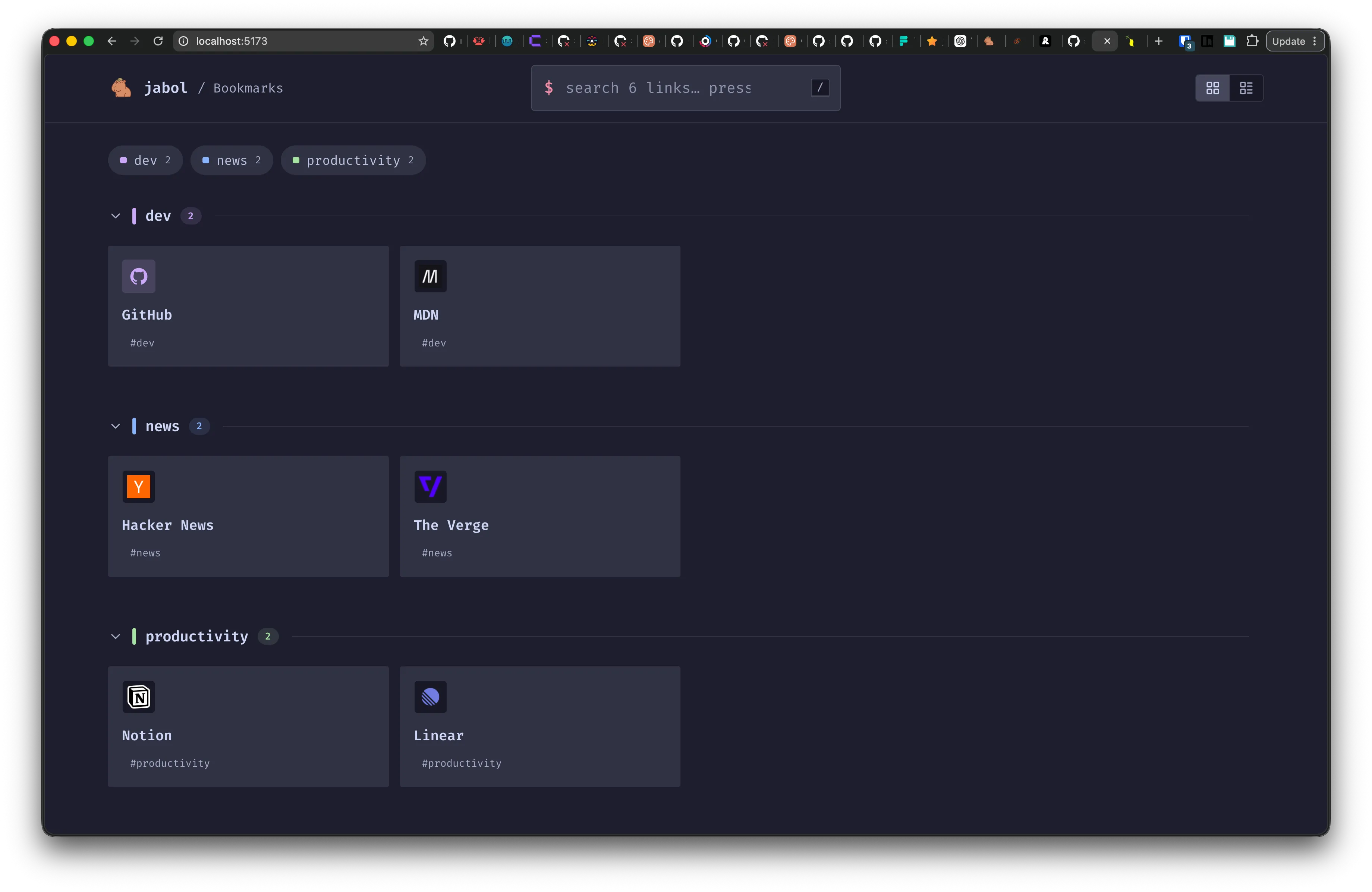
## A 30-second example
```sh
docker run -d \
-p 8080:8080 \
-v "$PWD/links.json:/config/links.json" \
-v "$PWD/data:/data" \
-e JABOL_AUTH_SECRET="$(openssl rand -hex 32)" \
stephanrandle/jabol:latest
```
Open , hit `/signup` to create the first admin, then edit your links from `/admin`.